

Summary
Liberty Center One has released new enhancements to its cloud management portal, built on OpenStack architecture, introducing self-service disaster recovery, on-demand data protection reporting, curated application deployment templates, and expanded infrastructure controls.
These updates provide IT teams, engineers, and MSP partners with greater operational control, faster recovery execution, simplified deployment workflows, and clearer validation of backup and compliance requirements directly from the portal.
Announcing Major Enhancements to the Liberty Center One OpenStack Cloud Portal
Liberty Center One is proud to announce a powerful new set of enhancements to its OpenStack cloud portal, delivering faster disaster recovery, expanded deployment capabilities, improved authentication workflows, and greater operational visibility across customer environments.
Built on OpenStack architecture, the LCO.Cloud platform continues to evolve with feature improvements designed to give IT teams, engineers, and MSP partners more direct control over their private cloud infrastructure.
This latest OpenStack release introduces self-service disaster recovery in under five minutes, on-demand data protection reporting, curated application deployment templates, storage flexibility improvements, and an enhanced login experience.
Here’s what’s now available.
Key Takeaways
- With these enhancements, Liberty Center One’s cloud management portal, built on OpenStack architecture, now enables disaster recovery testing and failover to be executed in minutes, shifting recovery operations from coordinated events to controlled, on-demand actions.
- On-demand Data Protection Reports eliminate manual audit preparation by providing instant backup validation and compliance-ready documentation.
- Curated application templates accelerate environment deployment while reducing manual configuration and infrastructure build time.
- Root volumes can be resized without rebuilding instances, removing a previously disruptive and time-consuming storage expansion workflow.
- Authentication workflow improvements and new interface themes enhance secure access and daily operational usability.
Liberty DR: Self-Service Disaster Recovery in Under Five Minutes
The flagship enhancement in this OpenStack portal release is Liberty DR, a new self-service Disaster Recovery module built directly into the Liberty Center One OpenStack interface.
See how Liberty DR delivers 5-minute, fully self-service failover: [Watch the Liberty DR Overview Video]
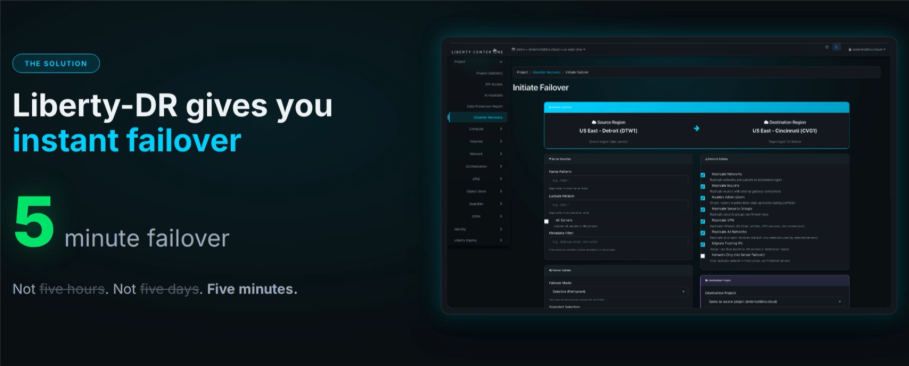
Customers can now:
- Initiate structured DR testing directly from within the OpenStack portal
- Execute live failover without opening a support ticket
- Complete recovery operations in under five minutes
- Validate replicated workloads on demand
- Recreate full network topology and environment configuration in the DR data center
Disaster recovery in any environment traditionally requires coordination, manual validation, and support engagement. Liberty DR transforms that process into a controlled, repeatable action executed directly by the customer from within the portal.
All production environments include disaster recovery data copies by default, ensuring recovery capabilities are built in rather than added on.
For organizations operating under compliance mandates or internal governance standards, this provides a faster and more transparent way to validate Recovery Time Objectives and document operational readiness.
Data Protection Reports: Backup Visibility Within Your OpenStack Cloud
Backup validation is now available on demand within the OpenStack portal.
Liberty Center One has introduced Data Protection Reports to provide clearer visibility into backup status, protected assets, and data location across customer environments.
For organizations operating under regulatory oversight or internal governance policies, validating backup posture often requires compiling documentation manually or requesting confirmation through support workflows. Data Protection Reports simplify that process.
With the introduction of Data Protection Reports, customers can:
- Generate on-demand backup validation reports
- Confirm which OpenStack workloads are protected
- Review backup status across their environment
- Document where protected data resides
- Produce executive-ready documentation for audit or reporting purposes
This eliminates manual reporting workflows and simplifies compliance validation for organizations operating within regulated industries.
Liberty Deploy: One-Click Application Deployment for OpenStack
Liberty Deploy accelerates application deployment by allowing customers to provision pre-configured application templates directly from within the cloud management portal using a curated deployment catalog.
Liberty Center One has introduced Liberty Deploy to simplify and standardize how application environments are built within customer cloud environments. Instead of manually provisioning compute instances, attaching storage volumes, configuring networking, and installing application dependencies separately, Liberty Deploy consolidates those steps into a guided deployment workflow.
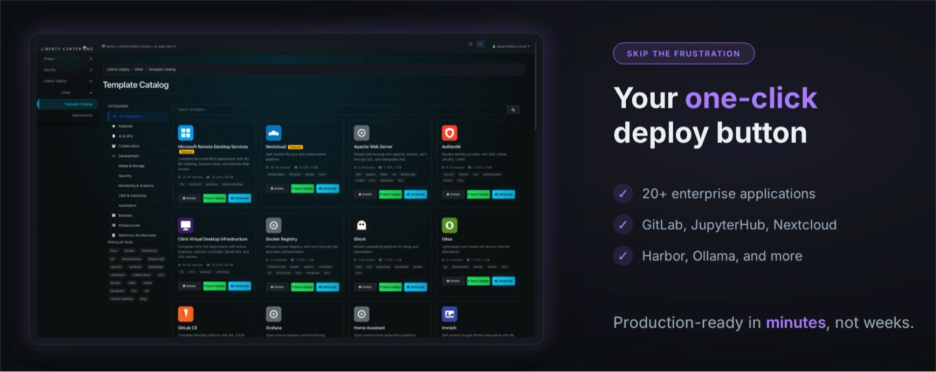
With this Liberty Deploy release, customers now can:
• Select from a curated catalog of production ready application templates
• Deploy through a guided workflow with required compute, storage, and networking provisioned automatically
• Automatically configure DNS and provision SSL certificates
• Launch environments that are production-ready in minutes
See how Liberty Deploy delivers fully automated, one-click deployment: [Watch the Liberty Deploy Overview Video]
Available templates currently include:
- n8n — a workflow automation platform deployed with required compute, storage, and networking resources to support API orchestration and internal process automation
- Microsoft RDS — a pre-configured Remote Desktop Services environment designed to centralize user access to applications and desktops
- GitLab CE — a self-hosted source control and CI/CD environment provisioned with the infrastructure needed to support development pipelines
- Nextcloud — a secure file sharing and collaboration platform deployed within the customer’s-controlled cloud environment
- Many more…
Each template provisions the necessary OpenStack infrastructure components, automatically accelerating deployment while maintaining full visibility and control within the Liberty Center One private cloud environment.
Root Volume Resizing, No Rebuild Required
With this release, Liberty Center One now supports in-place root volume resizing directly from within the cloud management portal, eliminating the need to detach and rebuild instances when expanding storage capacity.
Storage expansion is now dramatically simplified. Customers can now resize root volumes directly within the portal without rebuilding instances.
Previously, expanding root storage required detaching volumes and reconstructing instances, a time-consuming and disruptive process. Now, root volumes can be extended in place with only a brief reboot required.
What Has Changed in the Storage Workflow
With the new root volume resizing capability, customers can:
- Locate the attached root volume within the portal
- Select the extend option
- Specify the new volume size
- Reboot the instance to apply the change
By allowing storage expansion without instance reconstruction, root volume resizing now requires only a brief reboot rather than a full rebuild process.
Improved Login & Streamlined 2FA Enrollment
The login experience has been updated to separate the two-factor authentication code from the primary password field within the LCO.Cloud interface.
Users will now:
- Enter their password in a dedicated field
- Enter their two-factor authentication code in a separate field
This eliminates the previous requirement to append the MFA code to the end of the password, a workflow that created friction for customers using password managers.
Additionally, the 2FA enrollment process has been streamlined, making it easier to activate and manage multi-factor authentication within the portal.
New Interface Themes, Including Dark Mode
The cloud management portal now includes expanded interface theme options, including Dark Mode along with two additional premium themes: Liberty Ultra Dark and Liberty Ultra Light.
Users can switch between themes based on preference, improving visibility and comfort during extended sessions within the portal.
The portal now includes expanded theme options:
- Dark Mode
- Liberty Ultra Dark
- Liberty Ultra Light
For teams managing environments for long periods of time, users can switch between themes to improve comfort and visibility during extended sessions, without affecting infrastructure configurations.
Theme preferences can be updated directly within portal settings and do not affect underlying infrastructure configurations or workloads.
Continued Investment in the Liberty Center One OpenStack Platform
These enhancements represent the next phase in the ongoing evolution of Liberty Center One’s OpenStack cloud platform.
More exciting features and improvements are already in development and will be introduced in the coming weeks.
Have a suggestion or feature request? We want to hear from you. Drop us a line and let us know what capabilities would make the biggest impact in your environment.
To explore these new enhancements or discuss how they apply to your infrastructure, contact Liberty Center One at 248-336-7809 or visit www.libertycenterone.com.
Frequently Asked Questions About the OpenStack Portal Enhancements
Q. What is Liberty DR in the Liberty Center One OpenStack portal?
A. Liberty DR is a self-service Disaster Recovery module built directly into the Liberty Center One OpenStack cloud portal. It allows customers to initiate disaster recovery testing and execute live failover from within the portal interface without opening a support ticket and complete failover in under five minutes.
Q. Can I perform disaster recovery testing directly from the OpenStack portal?
A. Yes. The OpenStack portal allows customers to initiate structured disaster recovery testing directly within the interface, enabling teams to validate recovery readiness and confirm operational continuity on demand.
Q. How fast is failover using Liberty DR?
A. Failover operations can be executed in under five minutes from within the Liberty Center One OpenStack portal, depending on the specific environment configuration.
Q. What are Data Protection Reports in OpenStack?
A. Data Protection Reports are on-demand backup validation reports available within the Liberty Center One OpenStack portal. They allow customers to confirm which workloads are protected, review backup status, and generate compliance-ready documentation showing where protected data resides.
Q. Can I generate backup compliance reports on demand?
A. Yes. Customers can generate backup validation and compliance documentation instantly from within the OpenStack portal using Data Protection Reports.
Q. What is Liberty Deploy?
A. Liberty Deploy is a curated catalog of pre-configured application templates available within the Liberty Center One OpenStack portal. It enables customers to deploy applications such as n8n, Microsoft RDS, GitLab CE, and Nextcloud through a guided workflow that automatically provisions the required compute, storage, and networking resources.
Q. Can I resize a root volume in OpenStack without rebuilding my instance?
A. Yes. The updated OpenStack portal now supports in-place root volume resizing. Customers can extend a root volume directly within the portal without detaching or rebuilding the instance. A brief reboot is required to apply the change.
Q. How has the OpenStack login process changed?
A. The login experience has been improved by separating the password field and two-factor authentication (2FA) code field. This eliminates the need to append the MFA code to the end of the password and improves compatibility with password managers.
Q. Has the two-factor authentication enrollment process changed?
A. Yes. The 2FA enrollment process within the OpenStack portal has been streamlined, making it easier for users to activate and manage multi-factor authentication settings.
Q. Does the OpenStack portal now support Dark Mode?
A. Yes. The portal now includes Dark Mode along with two additional premium themes: Liberty Ultra Dark and Liberty Ultra Light. Users can switch themes within portal settings.
About the Author
Liberty Center One brings decades of experience providing secure cloud hosting and datacenter services for businesses. As a regional IT infrastructure solutions provider, Liberty Center One specializes in data protection, colocation, white-glove cloud migration, and backup and disaster recovery solutions backed by highly skilled professionals ready to support critical business needs.