

Disaster recovery testing is supposed to tell you whether critical systems can be restored when something goes wrong. But for an IT team already handling everyday operations, coordinating the test can feel like a second project.
One Liberty Center One customer was dreading an upcoming disaster recovery test. The amount of setup, failover coordination, and documentation looked like more work than the team wanted to take on. After talking through how Liberty Center One could help with regional failover, testing, documentation, and reporting, the process looked far more manageable.
Having a recovery solution is one thing. Proving it works shouldn’t take over your IT team’s schedule.
Disaster recovery testing is the process of validating that critical systems, data, infrastructure, and recovery procedures can be restored or failed over as intended during a disruption.
Key Takeaways
- Test before you need to recover. A written disaster recovery plan doesn’t tell you whether systems will actually run at the recovery site.
- Manual setup can be a bigger burden than the test itself. A provider that handles supported setup steps can give your IT team time back.
- Failover testing shows whether workloads will run in the recovery environment. It goes beyond confirming that copies of data exist.
- Test evidence should be easy to review. Screenshots, timestamps, and reports help IT teams and management see what happened.
- Liberty Center One supports self-service and engineer-guided testing. Your team can choose how much hands-on help it needs.
Why Is Disaster Recovery Testing Important?
A disaster recovery plan describes how your organization intends to restore critical systems after an outage or other disruption. Testing helps determine whether that plan can actually be executed.
Backups may be available. Recovery infrastructure may be in place. Replication may be running as expected. But those individual pieces do not necessarily tell you what will happen when workloads need to move, systems need to be restored, or infrastructure needs to fail over to another environment.
Testing gives your organization an opportunity to validate the recovery process before the business is depending on it during an actual disruption.
It can also help your IT team answer practical questions:
- Where will critical systems run during recovery?
- Can applications and servers fail over as intended?
- Is the necessary recovery infrastructure available?
- What will the recovery process require from your internal IT team?
- How will the results of the test be documented?
A successful test gives your IT team something more useful than a completed checklist. It shows which workloads came up, whether the recovery process worked as expected, and what still needs attention before an actual outage.
Why Do IT Teams Dread Disaster Recovery Testing?
Disaster recovery testing can sound straightforward until someone has to coordinate it.
Someone has to prepare the environment, check the results, and document what happened while the rest of the IT work continues.
That was the problem facing one Liberty Center One customer. The customer’s existing testing process required manually triggering and defining how instances would be created at the disaster recovery site. The team also had to create networks and network ports and document which instances had successfully started.
That work adds up.
Liberty Center One demonstrated the Disaster Recovery WebUI. The interface simplifies batch VM creation and deletion, automates the creation and removal of network assets, and records the test, including screenshots of running instances.
The customer’s reaction was immediate:
“Well, that makes it easy.”
A disaster recovery test that takes days to coordinate is a process worth improving, not proof that IT needs to work harder.
What Should You Expect During a Disaster Recovery Test?
A disaster recovery test should give your team a clear picture of what will happen if critical systems need to move into a recovery environment.
Depending on the environment and scope of the test, the process typically involves identifying the workloads being tested, initiating recovery or failover, confirming that systems are available in the recovery environment, and documenting the results.
For Liberty Center One customers, Liberty DR provides two ways to approach testing. Customers can perform self-service disaster recovery testing on their own or schedule the test with a Liberty Center One engineer who can guide them through each step of the process.
Customers can also choose which workloads they want to test for failover.
During a DR test, the goal is to answer practical questions such as:
- Did the expected workloads fail over successfully?
- Are systems available in the secondary environment?
- Does the recovery process work the way your IT team expects?
- What does your internal team need to do during the process?
- What did the test validate?
- What needs additional attention before an actual disruption?
DR testing is done without impacting production, and workloads can be failed over to the disaster recovery environment within five minutes.
Upon completion of the test, an automated DR report is provided, complete with screenshots and timestamps to validate the status of the DR test.
Liberty Center One engineers can also work alongside customers who want technical help during a test. Customers can manage testing themselves or work through the process with an engineer. Self-service doesn’t have to mean testing alone.
What Does Disaster Recovery Failover Testing Validate?
A disaster recovery test should do more than confirm that another copy of your data exists.
It should help demonstrate what happens when systems actually need to move into a recovery environment.
Disaster recovery failover testing validates whether workloads can transition from primary infrastructure to a recovery environment as designed when primary systems become unavailable.
A sample DR report below:
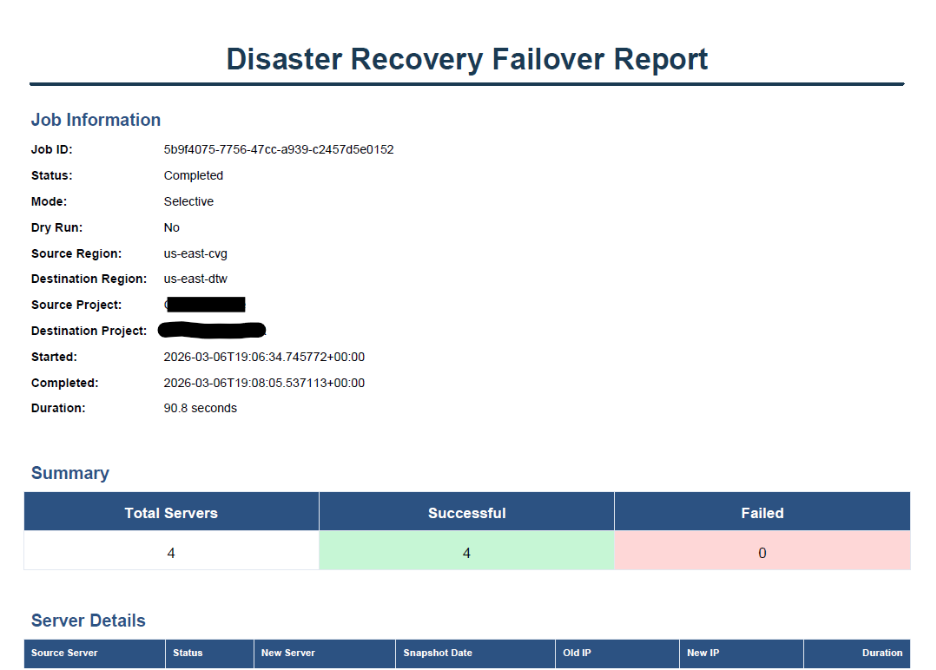
The specific recovery time will depend on the environment, workloads, configuration, and recovery requirements.
The larger value of failover testing is being able to demonstrate how the recovery process works before a real disruption forces your organization to rely on it.
What Should You Look for in a Disaster Recovery Testing Partner?
If your organization relies on an outside cloud or infrastructure provider for disaster recovery, testing should be part of the conversation.
Ask your provider:
- Will you help us plan and execute the disaster recovery test?
- Can we test actual failover into the recovery environment?
- Which responsibilities belong to our internal IT team and which will your team support?
- What technical assistance will be available during testing?
- Can the testing process and results be documented?
- Will we receive a report summarizing the test?
- What happens if the test identifies a problem?
A provider that hosts your recovery environment isn’t necessarily the provider that will help you test it. Make sure you know what testing assistance you’re getting before you need it.
How Does Liberty DR Make Disaster Recovery Testing Easier?
Liberty Center One developed Liberty DR to give customers a more direct way to test and execute disaster recovery failover.
Liberty DR allows customers to initiate structured DR testing or live failover directly from the Liberty Center One cloud portal. The platform is designed to support self-service failover in under five minutes without requiring the customer to open a support ticket to begin the process.
With Liberty DR, the test doesn’t have to start with an extensive manual setup. Customers can initiate it from the portal and concentrate on what the results show.
Liberty DR uses Liberty Center One’s replicated disaster recovery environment to support failover between geographic regions. Liberty Center One also replicates important environment metadata, including networking configurations, firewall rules, and security settings, so recovery involves more than restoring a copy of the data.
Liberty DR automates several of the steps that otherwise land on the IT team’s task list. Customers can initiate DR tests with a few clicks, and the system creates validation reporting rather than leaving someone to assemble it manually for management.
For some environments, that changes the workload considerably. Instead of spending days or weeks planning, executing, and documenting a test, a customer may be able to complete one while the boss is out to lunch and have the full report ready when they return. Actual timing depends on the environment and scope of the test.
For customers who want additional assistance, Liberty Center One’s engineering team can work alongside the internal IT team throughout the testing process.
How Often Should Disaster Recovery Be Tested?
There is no single testing schedule that fits every organization.
Testing frequency should reflect the criticality of the systems being protected, the complexity of the environment, your recovery requirements, and significant changes to infrastructure or applications.
An old test may not tell you what will happen after an infrastructure change. The useful question isn’t just, “When did we last test?” It’s “Does that result still reflect what we’re running now?”
Disaster Recovery Testing Should Build Confidence, Not Create More Work
A disaster recovery test should tell your IT team whether its recovery plan works—not leave them with another project to document.
With Liberty DR and access to Liberty Center One engineers, customers can test failover, capture the results, and identify anything that needs attention before an actual disruption.
To discuss your disaster recovery testing needs, contact Liberty Center One at 248-582-1600 or visit www.libertycenterone.com.
Frequently Asked Questions
Q. What is disaster recovery testing?
A. Disaster recovery testing validates whether critical systems, data, recovery infrastructure, and procedures can be restored or failed over as intended during a disruption.
Q. Why is disaster recovery testing important?
A. Disaster recovery testing helps determine whether a recovery plan can actually be executed. It allows organizations to validate recovery capabilities before a real outage or disruption requires them.
Q. What is the difference between disaster recovery and disaster recovery testing?
A. Disaster recovery is the strategy and infrastructure used to restore critical technology after a disruption. Disaster recovery testing is the process of validating that the recovery strategy works as intended.
Q. How can businesses make disaster recovery testing easier?
A. Working with an infrastructure partner that assists with the supported technical aspects of testing, failover, and documentation can reduce the amount of work an internal IT team must manage independently.
Q. What documentation should a disaster recovery test produce?
A. Documentation should provide a useful record of the testing exercise and its results. The specific information included will depend on the recovery environment, testing process, and provider.
Q. How often should disaster recovery testing be performed?
A. Testing frequency should reflect the criticality and complexity of the environment and the organization’s recovery requirements. Significant infrastructure or application changes may also create a reason to test again.
Q. How does Liberty Center One help with disaster recovery testing?
A. Liberty Center One can work alongside customers during the disaster recovery testing process, support regional failover testing, provide documentation, and deliver executive-level reporting based on the testing exercise.
About the Author
Jason Huebner is the Managing Director at Liberty Center One.
Liberty Center One brings decades of experience providing secure cloud hosting and datacenter services for businesses. As an IT infrastructure solutions provider, Liberty Center One specializes in data protection, colocation, white-glove cloud migration, and backup and disaster recovery solutions backed by highly skilled professionals ready to support critical business needs. Learn more at https://www.libertycenterone.com/.